
Modelling & Effects Update: New Towers, Units and a Better Building Bar
Renewed faction towers and effects, 33 assault units, a permanent building bar, tutorial improvements and more changes in the October 22 Playtest update.
Original announcement · English
Our October 22 Playtest update collects the changes since our October 19 announcement. Steam Build 26116867 and its matching game server are now live.
The free Playtest is open to everyone every day during development. Update through Steam and restart before joining. This is a development Playtest, not the main game's commercial launch.
View the original screenshot on Steam ↗
View the original screenshot on Steam ↗
Tell us which faction and unit you tried, and share bugs or suggestions in Steam Discussions, Discord or Reddit. Thank you for helping shape Rampartloom!
Join the free Playtest · Discord community · Official Reddit
← All published updatesThe free Playtest is open to everyone every day during development. Update through Steam and restart before joining. This is a development Playtest, not the main game's commercial launch.
View the original screenshot on Steam ↗
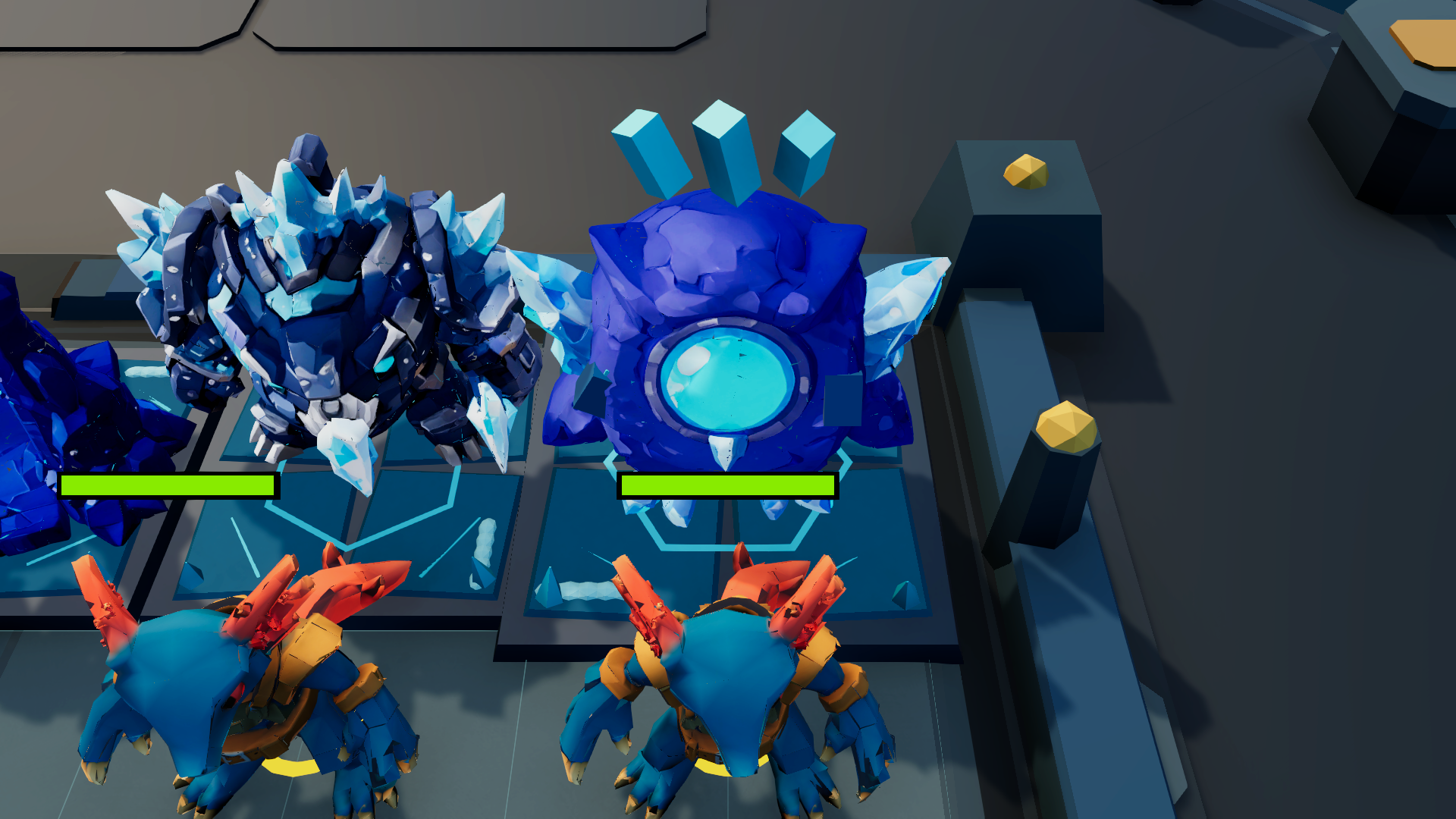
Tower modelling and animation
- Tide's nine tower forms have new models with distinct sea-themed silhouettes.
- Thunder gains nine renewed forms: seven base towers and two transformations.
- Ember's seven forms now use original fire-and-lava designs.
- Glacier's seven forms now use original ice-and-crystal designs.
- Together with Brass and Root, six factions now have 49 renewed tower forms.
- Tower portraits show the actual new models throughout their cards and information screens.
- Tide, Brass and Root towers now move while idle, with their bases staying planted.
- Thunder, Ember and Glacier gain model-specific idle, aiming and attack movements.
- Root idle movement is 15% faster, with 20% more sway and breathing movement.
- Gear Sentry's entire wheel rotates, including its previously stationary rear face and lower teeth.
- Root's ten forms are larger and better fill their building squares.
- Sprout Coil uses dark green leaves, green buds and brown roots; its red edging is gone.
- Venom Coil shares the forest palette while keeping its purple poison sacs.
- Thorn Engine and Bramble Engine have darker foliage, burgundy roots and clearer pale thorns.
- Shallows Beacon and Breakwater have closed rear shells instead of cut-open surfaces.
- Their pale shell surfaces now use sea-blue and turquoise materials with darker rear shells.
- Tide muzzle alignment and projectile origins now match the weapon tips.
- Separated surface pieces during Tide animations have been corrected.
- Tidal Marshal is 65% larger, including its spear and firing origin.
- Tide upgrades add permanent shell armor and dorsal fins visible from above.
- Thunder upgrades add visible capacitors and crown details.
- Ember and Glacier upgrades gain armor and furnace or ice-crown details.
View the original screenshot on Steam ↗

Shots, construction effects and foundations
- The six refreshed factions have tower-specific projectile shapes, trails and impact effects.
- Tide attacks use water, pearls and harpoons; Shallows Beacon gains flowing water and splashes.
- Brass uses metal sparks and mechanical shots; Root uses wood, leaves and spores.
- Thunder attacks include needles, twin arcs, energy orbs and spears.
- Ember uses embers and lava; Glacier uses ice and crystals.
- Support towers keep their support role rather than gaining a damaging projectile.
- Building a tower plays a faction-themed water, spark, leaf, lightning, lava or ice effect.
- Each refreshed tower has a slightly raised, opaque foundation that covers the grid beneath it.
- Foundations carry themed shells and coral, bolts, roots and moss, conductors, volcanic stone or ice details.
- Empty cells retain their grid; foundations do not grow when a tower upgrades.
- Every 10 seconds, each eligible tower has a 3% chance to show a gentle foundation aura.
- Ambient checks are staggered; the repeated aura is silent and limited to four simultaneous effects.
- Reduced Effects disables ambient auras and reduces construction particles and interface motion.
All three assault tiers
- All 33 assault units now have individual models, textures and portraits across Levels 1, 2 and 3.
- Running, flying, limb and tentacle movements are tailored to each unit's body.
- Locomotion follows actual movement, including stopping, slowing and speeding up.
- Root Giant now swings its branch arms and hands clearly while walking.
- Night Predator faces its travel direction instead of moving sideways.
- Abyss Weaver's new legged model rests on the ground instead of floating.
- Frost Revenant is about 68% larger, with its health bar raised to match.
- Five endgame units follow Abyss Weaver: Obsidian Strider, Tempest Warden, Eclipse Behemoth, Rift Sovereign and Worldbreaker.
- Each tier now contains 11 units; the final three endgame steps bring a substantial power increase.
- Worldbreaker cannot be killed by attacks, spells, pure damage, damage over time or life drain. It can still be slowed and follows normal crossing rules.
- All 33 base movement speeds are between 5 and 8 units/s: 17 units at 6, seven at 5, six at 7 and three at 8.
- The last five Level 3 units use speeds 6, 7, 5, 6 and 5; expensive units are no longer all fast.
- Each unit type has its own 5/5 stock and opens at 1/5.
- Refill intervals follow unit order: 1–11 seconds in Level 1, 12–22 in Level 2 and 23–33 in Level 3.
- Locked stock does not refill; full stock never exceeds five or banks refill time.
- The normal ten-send limit per round remains in place; normal mana is disabled.
- Stock and refill labels sit in the card's upper-right corner on a smaller dark backing.
- Clicking a unit or using its shortcut flashes its card turquoise and gives the portrait a short press animation.
- Blocked sends flash red; Reduced Effects removes the press movement.
- Old yellow and colored role rings under normal units are removed; boss auras and health indicators remain.
- Unit tooltips show actual speed and separate physical and magic damage modifiers instead of raw armor.
- Tooltips explain slow/stun duration resistance, regeneration, evasion, blocks, night effects and death curses where applicable.
A permanent tower building bar
- Tower cards stay at the bottom center throughout the match; the ground-click building menu is removed.
- Cards are square, with larger model portraits, navy surfaces, turquoise edges and small gold prices below.
- Number shortcuts appear at the upper left, while a small ? help button stays at the upper right.
- Shortcut labels reflect your actual key bindings; hovering reveals the tower description.
- Affordable cards glow blue/turquoise; unaffordable cards turn gray.
- The selected card has a brighter surface and a prominent yellow border.
- Mouse, shortcut and gamepad selection trigger a brief press animation.
- The old green strip above the cards and the shared outer frame are removed.
- Choose a tower icon or press 1–8, then click a valid square to build it immediately.
- One selection builds one tower. After success, selection clears and the normal mouse cursor returns.
- Select the icon or shortcut again for another tower; holding the key does not repeat construction.
- With no tower selected, hovering the maze shows no green placement square or building cursor.
- Right-click or Escape cancels placement; the unarmed gamepad navigation cursor is blue.
- If you cannot afford the selected tower, the placement square turns red and shows the required gold.
- When enough gold arrives, a legal square turns green without needing to move the mouse. Failed clicks spend no gold.
Upgrades, controls and tutorial
- Available UPGRADE buttons use vivid blue/turquoise, white text and a stronger hover highlight.
- Unavailable upgrades stay gray; the open panel refreshes when gold or prerequisites change.
- Tower descriptions show the gold price in bold color, then DPS, attack range, hit damage and attack rate.
- G activates the first upgrade action; H activates the alternative upgrade action when available.
- T sells the selected tower; Delete remains an alternative. The local speed shortcut moves to Y.
- Tower panels and control settings show the updated shortcuts; typing in chat does not activate tower actions.
- The normal arrow, building hammer and camera-drag hand cursors are 30% larger, with aligned click points.
- Tutorial teaches selecting the bottom bar or 1–8 first, then clicking a legal green square.
- Tutorial explains that every successful build clears selection and the next tower must be selected again.
- Tutorial explains prices, affordability colors, help and cancellation; clicking empty ground unarmed does not advance the task.
- The 750-gold assault-upgrade lesson is removed from the basic tutorial.
- The tutorial more clearly explains permanent income from sends and ends with build, send and earn.
- Existing tutorial completion records are preserved.
Tower balance and range
- All tower and upgrade forms have a maximum range of 7.5; shorter ranges are preserved. Twelve forms have reduced range.
- Range circles and attack checks use the same horizontal distance.
- Towers stop starting new shots at targets that have moved into another lane.
- Crown Reactor is Unlimited instead of sharing a four-tower limit; the overall tower cap still applies.
- Crown Reactor damage and build cost both increase by 100%, to 3,500 damage and 4,000 gold.
- Rot Crown damage and transformation cost both increase by 50%, to 12,825 damage and 14,250 gold.
- The full Crown Reactor-to-Rot Crown path costs 18,250 gold; Rot Crown retains its one-tower limit.
- Archive's five attacking forms reduce their maximum-HP-based extra base DPS from 2.5% to 1%.
- Archive prices are Wandering Rune 12g, Star Passage 75g, Rune Totem 250g, Axis Scribe 500g and Final Star 1,100g.
- Archive Titan has an 8,000g total value, with a 7,500g transformation from Axis Scribe.
- Archive information and upgrade previews show the actual 1% value.
Battlefield and gold feedback
- Central courtyards are fuller, with 52 trees, 100 rocks and 400 grass clumps across both sides.
- Courtyard arrangements are mirrored, while the center sightline, paths and legal building areas stay clear.
- Small decorative stone clusters at maze exits are removed from all player fields.
- Yellow turn rings and circular route decorations are removed; the blue route line remains.
- Thin orange fence-edge fragments that appeared while panning the camera are cleaned up.
- A thin transparent grid follows actual maze cells and fades as the camera zooms out.
- Kill gold uses a clearer gold-colored +Ng label on a dark backing and stays readable when zoomed out.
- Rapid nearby rewards merge into a total, with at most eight labels visible at once.
- Gold labels stay below the top HUD and within screen edges; reward amounts are unchanged.
- Reduced Effects removes the gold label's rise and scale animation.
Chat, menus and online fixes
- Global Chat is always visible at the lower left of the main menu, with wider history and typing areas.
- FACTIONS, PLAY TUTORIAL and PRACTICE MATCH sit above chat; the right panel has more room for friends.
- Search and MATCH FOUND keep chat at the lower left, with YOUR POSITION in the illustrated column.
- The search and MATCH FOUND panel is centered without overlapping neighboring panels.
- Party, profile and FIND MATCH are centered between chat and friends, with more spacing and a blue profile design.
- OLDER and LATEST have their own space above messages; connection notices sit below the panel.
- Draft text and chat history survive menu/search transitions and search cancellation.
- New Global Chat messages play a short sound and show a turquoise highlight and NEW indication.
- In-match chat sits between the Economy table and the tower upgrade panel.
- New TEAM/ALL messages reveal chat, scroll to the latest message and restart its 30-second reading timer without stealing keyboard focus.
- Chat appears at match start, hides after 30 quiet seconds and returns with a message or Enter/Shift+Enter.
- Typing refreshes the timer; idle hiding preserves an unfinished draft, while Escape cancels it.
- Messages received while chat is closed no longer fall outside its visible area.
- Messages behind another window appear after it closes; an unread counter clears when chat opens.
- The typing caret stays on the text line and in view; the caret and text are easier to read.
- History loads and repeated polling do not replay notification sounds; bursts are limited and SFX mute is respected.
- Visual message notices remain available when sound is muted or Reduced Effects is enabled.
- Returning from the menu to the same match preserves command order, so a new build is not rejected as an old duplicate.
- Reconnect retries retain your match and seat; existing towers return and repeated commands cannot charge gold twice.
- Canceling a WING search and choosing CENTER releases the old waiting seat after server acknowledgment.
- Repeated searches from the same player no longer consume duplicate allocator capacity.
- Verified version mismatches now show UPDATE REQUIRED with update/restart instructions instead of a misleading retry.
- The matching server for this Steam update is active; genuine connection or capacity errors remain separate.
- CENTER bots independently choose among three layouts; both can choose the same one. WING's two layouts remain.
SHOP, PROFILE and earned cosmetics
- SHOP offers 37 cosmetics: totems, portraits and profile frames, in compact cards on one page.
- All current cosmetics unlock through starting items, match/win milestones or earned Coin; real-money sales are closed.
- PROFILE shows only the portraits, totems and frames you own and lets you equip them.
- Totems appear beside the profile, not above towers or units; the old overhead team/seat decorations are removed.
- Completed normal matches award 100 Coin for a win or 25 for a loss.
- Results show earned Coin and your balance; the main menu shows a Coin icon and balance at the upper left.
- SHOP keeps acquisition requirements visible and marks owned items with gray OWNED cards.
- Coin purchases require confirmation and never charge twice for an owned item.
- Leaf Charm, Moon Key and Bead Bracelet are free starting totems.
- Victory Star unlocks at 10 wins, Champion Crown at 100 wins and Veteran Hourglass at 100 completed matches.
- The ten existing portraits and Simple Frame/Woven Frame remain free.
- Copper Bell costs 300 Coin and Sky Thread costs 500 Coin.
- Wayfarer Owl costs 2,500 Coin, Laurel Frame 3,500 Coin and Compass Charm 5,000 Coin.
- The four themed collections unlock at 20/75 completed matches and 150/300 wins instead of the old paid-pack plan.
- SHOP has larger names, clearer descriptions and stronger turquoise selection/equip actions.
- Totems gain metal finishes, frames gain woven/leaf details and Wayfarer Owl gains a matching character portrait.
- Mouse, keyboard and gamepad navigation are supported in SHOP and PROFILE.
- Coin and Coin purchases are stored locally at this stage; deleting local data removes them.
Music and sound
- New instrumental track Stormstring Assault combines electric guitar, drums and violin.
- Stormstring Assault is the main-menu theme and opens the match playlist; the previous match tracks remain.
- Music tracks are matched in loudness, with menu and match playback sharing the same volume and mute settings.
- Your own sent unit reaching the opposing center exit and costing lives triggers a strong new success sound.
- Rapid successful crossings are grouped to avoid overlapping stingers; SFX volume and mute still apply.
- Root firing and impact sounds are shorter and less sharp, with deeper wood tones for Resin Node and Venom Coil.
- Repeated Root sounds are limited more aggressively in dense tower groups.
Still being refined
- Balance and dense-scene performance remain in development; this update does not claim final balance or a verified 60 FPS target.
Tell us which faction and unit you tried, and share bugs or suggestions in Steam Discussions, Discord or Reddit. Thank you for helping shape Rampartloom!
Join the free Playtest · Discord community · Official Reddit